Statutory rates: every rate carries its source and is approved first
Every GST, TDS, TCS, payroll and threshold figure is a dated row that cites the notification or section it came from. A person approves each change in a central registry before any company receives it, and the company's Accounts Head approves thresholds and payroll figures. Nothing changes a calculation until it is approved.
Pujan Motiwala · Written for Indian manufacturers and their CAs · Checked against the system's own finance notes and code on

Why not just type the rates in?
Because they change, and a wrong rate on an issued invoice can only be fixed with a credit note. GST rates moved for most goods on 22 September 2025, the Income-tax Act, 2025 renumbered every TDS section from 1 April 2026, and the PF wage ceiling changed in September 2026. So in this system a rate is never a number in the code. It is a row with:
- the figure (a rate, a limit, a slab);
- the date it applies from, and to;
- its source: the notification, section or circular, with its number and date;
- its state: proposed, to verify, or approved, and who approved it.
A change is a new row from its new date; an approved row is never edited. An invoice dated before the change still uses the old rate.
Who approves what?
There are two places a rate is checked:
- The central registry. Ahrom Labs keeps one registry of rates for all its clients. Official schedules are loaded from the notification texts (for GST, the whole goods schedule under Notification 9/2025 with amendments 19/2025, 01/2026 and 02/2026, and the service headings a machinery maker bills), each row citing its entry. A person approves a change before any company receives it, and each company's system pulls approved rows once a day. Who approves in the registry for a given client, Ahrom Labs or the client's CA, is agreed with the client.
- The company's own system. Thresholds and payroll figures are approved by the company's Accounts Head in Accounts → Compliance and Accounts → Payroll & Tax Rates. A row whose official text couldn't be read automatically is marked "verify" and can only be approved one at a time, with the source typed in; the Accounts Head can correct a plain number while approving, and the change is in the audit log.
Until a figure is approved, the calculation it feeds either isn't done (no TCS without an approved rate, no freight GST posting without an approved rate) or runs the older way (a salary slip without approved payroll rows). Next on the list is a Rate updates screen in Accounts, where the company accepts each registry change before it reaches its books; today approved registry rows are applied on the daily pull.
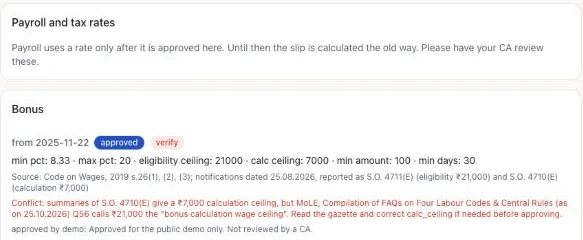 Each rate row shows its source, who approved it, and a 'verify' tag with the conflict to resolve. On the demo, rows are approved for the demo only.
What is on the Compliance screen?
- Thresholds, each with its source: the e-invoice turnover limit, the e-way bill value (with the states whose own limit differs), TCS on scrap, and the TDS limits per nature of payment.
- Due dates for GSTR-1, GSTR-3B, TDS and TCS deposits, the quarterly TDS and TCS returns, PF, ESI and professional tax, shown as overdue, due soon or upcoming, with Mark done.
- Interest and late fees for GST and TDS, as reference rows: the system shows the rule, it doesn't yet calculate an amount.
- Every rate table's citations, so a CA can see where each figure came from.
- HSN clean-up: products with a missing or unlisted HSN code, with a suggested code, changed only for the rows a person ticks.
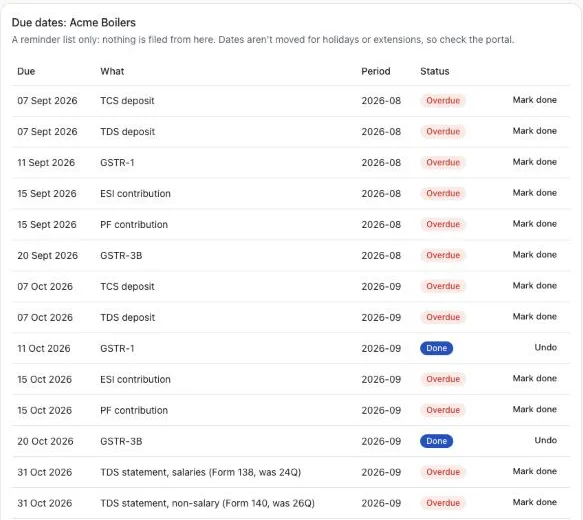 Due dates on the Compliance screen, overdue or done, each with Mark done. Nothing is filed from here.
What does the demo show?
On the boiler manufacturing demoboiler manufacturing demo, the GST schedule, thresholds and payroll figures are approved for the demo only and labelled that way, so you can see the full behaviour. For a client, every figure starts unapproved and the client's team approves it. How payroll uses these figures is in payroll and statutory pay; how the returns use them is in GST returns and TDS files. The design behind the registry is in keeping GST, TDS and income-tax rates current across every system.
A worked example
Scrap TCS rates show how a dated row works. The rows carry 1% for invoices dated before 1 April 2026 and 2% from that date, each citing its source. A scrap invoice dated 28 March 2026 picks 1%; one dated 2 April 2026 picks 2%, but only once the Accounts Head has approved that row. Until then, the second invoice carries no TCS at all, rather than a guessed one.
Who does what?
| Step | Ahrom Labs | Your Accounts Head | Your CA |
|---|---|---|---|
| New rates | Loads the official schedule or notification as draft rows, each citing its source | — | — |
| Registry approval | Approves each change before any company receives it (or your CA, as agreed) | — | May be the approver |
| Company approval | — | Approves thresholds and payroll rows; types the source for rows marked "verify" | Advises before approval |
| Use | — | — | Reviews the first returns built from them |
What it doesn't do yet
- A Rate updates screen, where the company accepts each registry change before it reaches its books, is planned; today approved registry rows are applied on the daily pull.
- Interest and late fees are shown as rules, not calculated amounts.
- Holidays and one-off extensions aren't moved into the due dates.
Common questions
How does an ERP keep GST and TDS rates current?
By holding each rate as a dated row with its source and pulling approved changes from a registry daily, so an invoice dated before a change keeps the old rate and one after it gets the new one.
Who approves tax rates in the ERP?
A person, twice: the registry change is approved before any company receives it, and the company's Accounts Head approves thresholds and payroll figures, usually on the CA's advice.
What does "verify" mean on a rate row?
The official text couldn't be read automatically, so the row can only be approved on its own, with the source typed in by the person approving it.
Are statutory due dates shown?
Yes: GSTR-1, GSTR-3B, TDS and TCS deposits, Forms 138, 140 and 143, PF, ESI and professional tax, each overdue, due soon or upcoming, with Mark done.
Sales, purchase, stores, dispatch, payroll and service in one system, with the books written as the work happens. We build it around your own departments and approvals, and your CA keeps filing on the portals.
A sample company with a login per department, data reset nightly: try the boiler manufacturing demotry the boiler manufacturing demo and sign in as Accounts.
Official sources
What this page is not
A guide written by Ahrom Labs about a system it built. It describes what the software does, checked against the software itself; it has not yet been reviewed by a Chartered Accountant, and rates and rules change. Not tax, legal or accounting advice: your CA decides how your books and returns are kept. Last updated .
Talk to us about your systems.
Tell us what's held together with workarounds right now. We reply to every message ourselves.