Month-end and reports: reconcile, depreciate, lock, export
Accounts reconciles the bank, runs depreciation, clears the system's warnings such as unposted documents, draft journals and filings not marked done, then locks the month so nothing more can be posted into it. Every report opens on screen and downloads as PDF and Excel from the same calculation, and the audit log records who did what.
Pujan Motiwala · Written for Indian manufacturers and their CAs · Checked against the system's own finance notes and code on

What does a month-end look like?
- Reconcile the bank. Import the bank statement, tick each line against the books, and post bank charges and similar lines with quick entries (they default to 5400 Bank Charges).
- Run depreciation for the fixed assets.
- Clear the warnings (below).
- Hand the CA the returns' data: GSTR-1, GSTR-3B and, at quarter end, the TDS files (see GST returns and TDS files).
- Lock the month in the general ledger. Nothing can be posted into it after that (see how the books post).
The assistant keeps a month-end checklist: ask it what is blocking last month's close and it lists each item with the figure, from the same records (see AI answers for finance).
Bank reconciliation
The statement is imported from the bank's file and each line is ticked against a receipt, payment or entry; what's left unticked is the difference to explain. The import has been tested on a hand-made file only, not yet on a real bank's export: the first real month is where its columns get mapped, as they differ by bank.
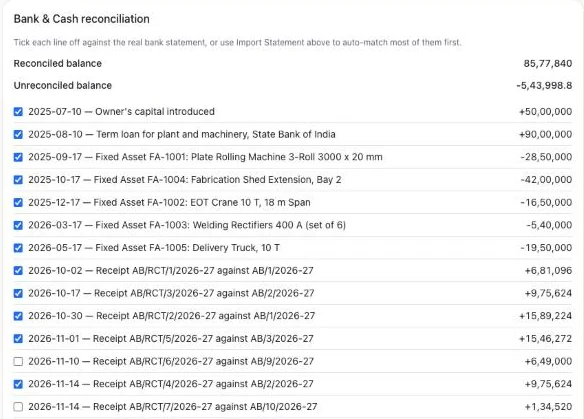 Bank reconciliation: ticked lines match the statement; the unreconciled balance is what is left to explain.
Fixed assets and depreciation
- Companies Act depreciation on straight-line or written-down value, posted by a depreciation run: debit 5300 Depreciation, credit 1410 Accumulated Depreciation.
- Disposal removes the cost and accumulated depreciation and posts the gain or loss to 4200.
- Income-tax depreciation is kept separate, as a report that posts nothing: blocks of assets under the Income-tax Rules, 2026 at their rates, half the rate for an asset used under 180 days in the year, sales out of the block, short-term gain or loss, and the 20% additional depreciation for eligible new plant when Accounts ticks its conditions. Your CA should confirm those conditions and give older assets their opening tax value.
- Assets owned at go-live go in with their depreciation to date (see going live).
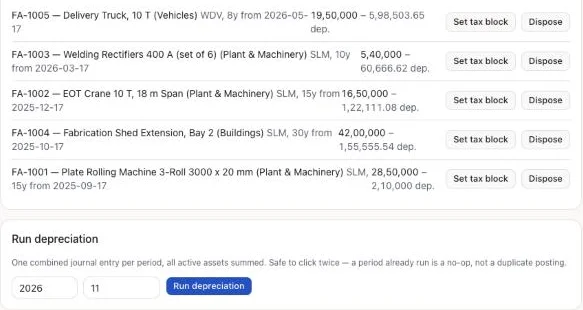 Fixed assets with depreciation to date, each with its tax block; depreciation runs once per period.
What warnings does the system raise?
Overdue customers, filings not marked done, a supplier who crossed a TDS limit, an invoice whose GST % differs from the schedule, possible duplicate supplier bills, documents not posted, draft journals left open and old unreconciled bank lines.
Which reports are there?
Every report is computed once and shown three ways: on screen, as PDF and as Excel. So the figure the owner sees, the PDF the bank gets and the Excel the CA works in are the same.
| Area | Reports |
|---|---|
| Books | Trial balance, profit and loss, balance sheet, cash flow, general ledger and account ledgers |
| Customers and suppliers | Receivables ageing, payables ageing, sales register, purchase register, open PO ageing |
| Tax | GSTR-1, GSTR-3B and the ITC match, TDS register |
| Assets and bank | Fixed assets, tax depreciation, bank reconciliation |
| Stock | Stock valuation, stock ledger, stock movement |
| Dispatch | Dispatch, e-way bill and freight registers |
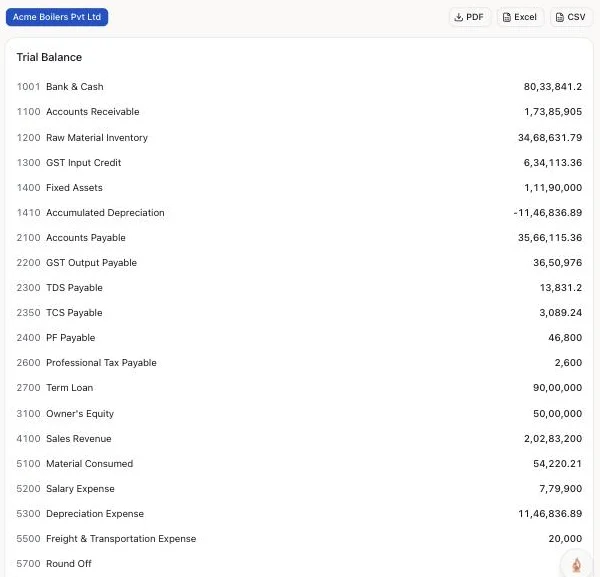 The trial balance, with the PDF, Excel and CSV buttons every report has.
The audit log
The audit log records actions such as approvals, payment reversals, rate approvals and a confirmed GST rate that differed from the schedule, with who did it and when. Combined with posted documents that can't be edited, this is what a CA or auditor reads to follow a figure back to the person and document behind it. The general idea is in audit trail.
A worked example
The month's depreciation run for plant and machinery bought for ₹28,50,000, depreciated straight-line over 15 years, is about ₹15,833 a month. The run posts one combined entry for all assets: debit 5300 Depreciation, credit 1410 Accumulated Depreciation. A second run for the same month does nothing, so it can't double the charge. After the run, the bank is reconciled, warnings are cleared and the month is locked.
Who does what?
| Step | Accounts | The system | Your CA |
|---|---|---|---|
| Bank | Imports the statement and ticks lines | Matches what it can; shows the unreconciled balance | — |
| Depreciation | Runs it for the month | Posts one entry; a second run does nothing | Confirms methods and the tax blocks |
| Warnings | Clears each one | Lists unposted documents, drafts, filings, duplicates | — |
| Close | Locks the month | Refuses postings into it | Reviews the reports |
What it doesn't do yet
- Bank import is tested on a hand-made file only; the first real month maps your bank's columns.
- Income-tax depreciation is a report and posts nothing; older assets need their opening tax value.
- Budgets and cheque printing are not built.
Common questions
What reports does a manufacturing ERP's finance module give?
Trial balance, profit and loss, balance sheet, cash flow, ledgers, receivables and payables ageing, sales and purchase registers, GST and TDS reports, fixed assets and depreciation, bank reconciliation, stock valuation and the dispatch, e-way bill and freight registers.
Can reports be exported to Excel?
Yes. Every report downloads as Excel, PDF and CSV from the same calculation as the screen, so all three show the same figures.
Does it keep Companies Act and income-tax depreciation separately?
Yes. Companies Act depreciation posts to the books; income-tax depreciation by block, with the half rate for assets used under 180 days and additional depreciation, is a separate report.
What does locking the books do?
Nothing dated inside the locked period can be posted afterwards, so a month your CA has signed off can't change.
Is there an audit log?
Yes. It records actions such as approvals, payment reversals, rate approvals and a confirmed GST rate that differed from the schedule, with who did it and when.
Sales, purchase, stores, dispatch, payroll and service in one system, with the books written as the work happens. We build it around your own departments and approvals, and your CA keeps filing on the portals.
A sample company with a login per department, data reset nightly: try the boiler manufacturing demotry the boiler manufacturing demo and sign in as Accounts.
Official sources
What this page is not
A guide written by Ahrom Labs about a system it built. It describes what the software does, checked against the software itself; it has not yet been reviewed by a Chartered Accountant, and rates and rules change. Not tax, legal or accounting advice: your CA decides how your books and returns are kept. Last updated .
Talk to us about your systems.
Tell us what's held together with workarounds right now. We reply to every message ourselves.